Orange Glow

Picture Specs: ISO 800, 35mm, f/2, 1/125sec

Picture Specs: ISO 800, 35mm, f/2, 1/125sec

Week 12 (10/20/2013 – 10/26/2013): Bloomfield St., Hoboken NJ
Picture taken on 10/24/2013 at 8:14 PM

Picture description:

What a busy week!  Lucky walking, or running, around Hoboken always seems to provide interesting pictures when I don’t have the time to plan something.   This week my goal was to try and get a picture related to the fall or Halloween.  With a crammed schedule all I could do was hope that something would present itself, and it did!

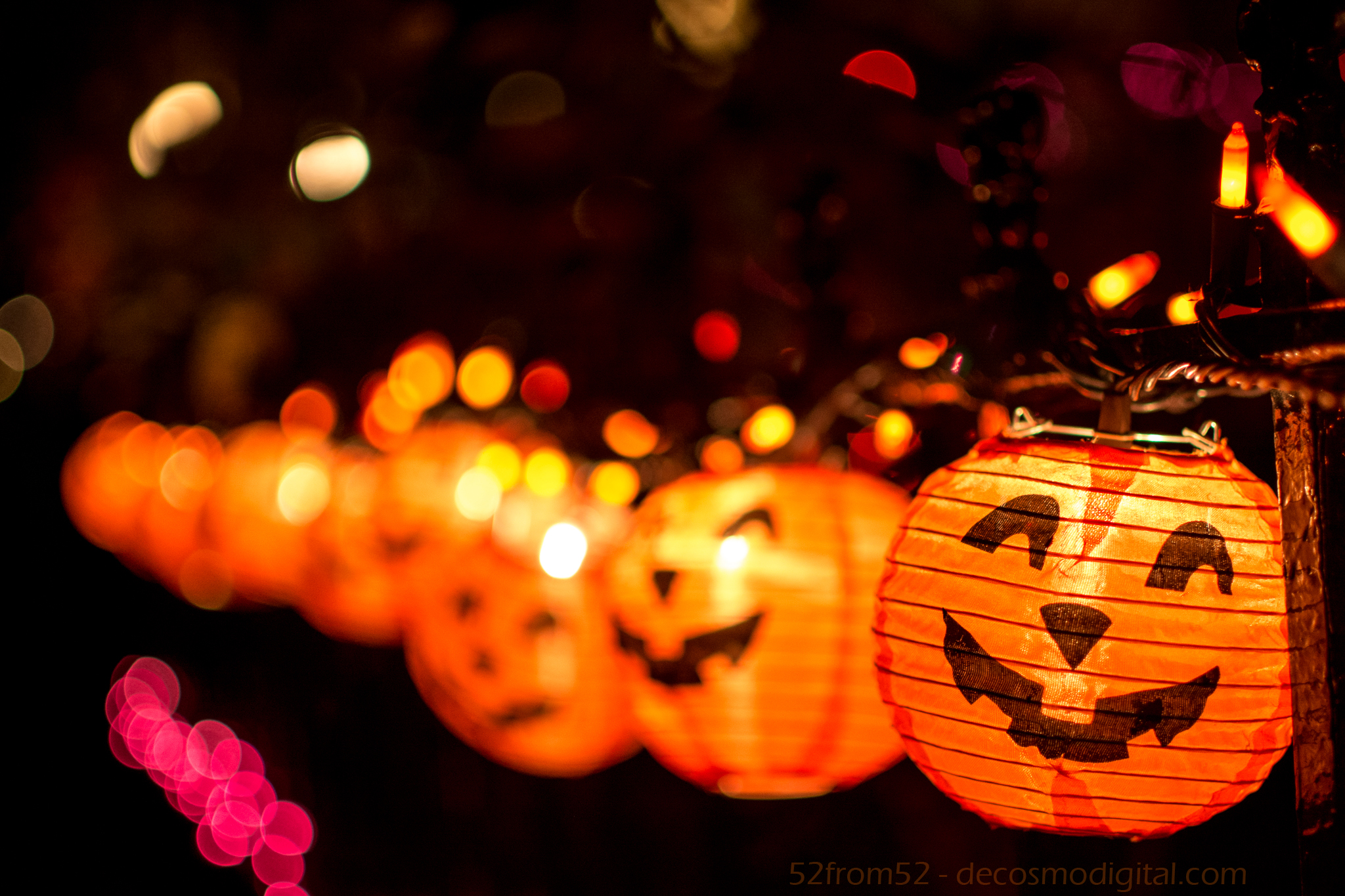
Normally I run along the water in Hoboken but on Thursday I decided to change it up and run down Bloomfield St. since lately there seemed to be this orange glow emitting from the street.  Much to my surprise the people in Hoboken are really into decorating for Halloween.  Most of the houses lining Bloomfield had at least some interlaced webbing along their stoop, if not a full out Halloween scene.  Running down the street was almost like going through a haunted house since there were witches, ghosts and spiders littered all over.  Along my path I even stumbled upon a news crew camped out around one of the more creative houses.  The news crew was likely talking about how intense and competitive decorating for Halloween gets in Hoboken.   There were so many houses I could have chosen but the one that caught my eye featured a string of jack-o-lanterns that seemed to be smiling at me.  After finding my subject I ran, literally, back to my apartment to grab my camera (no I didn’t run with it!) and went back out to get my shot.

Photography concepts:

Like in my other night pictures the biggest challenge was dealing with the low amount of light.  My subject (the jack-o-lanterns) were nice enough to emit a good amount of orange glowing which enabled me to drop my ISO.  Hopefully by now you know what ISO is and how it’s related to light, if not circle back and read either my week 3 or week 4 blog.  Back to ISO, thanks to the light coming from the lanterns I could shoot my picture with an ISO of 800.  I probably could have gone lower but I didn’t want to creep in front of some persons house for too long.  Using the lower ISO left my picture looking crisp rather than grainy as is usually the result from a higher ISO.

The other aspect of the “triangle of photography” which helped shape my picture was the aperture that I used.  In this picture my aperture was f/2 which is part of why I was able to shoot with a low ISO.  f/2 is one of the largest apertures you can use and lets in a lot of light.  One of the results from using wider apertures is the background blur caused by a shallow plane of focus that I’ve talked about in past blogs.  Having a shallow plane of focus is why you can clearly (or not so clearly) see the pumpkins gradually get more and more blurry as they move further away.

The last thing I want to point out about this picture is how I lined it up.  It’s often tempting to take a picture head on but I highly encourage you to try to find a unique angle that perhaps you wouldn’t see while walking around.  Not too many people would bend down and look straight down the line of jack-o-lanterns.   Anyone passing by might stop and look at the lanterns head on, this is why finding a unique angle is way more interesting.  Get low, get high (legally), and find that unique angle!

A Day of Reflection Pt 2

Picture Specs: ISO 200, 35mm, f/4, 1/640 sec

Picture Specs: ISO 200, 35mm, f/4, 1/640 sec

Week 11 (10/13/2013 – 10/19/2013): Chelsea 11 Ave/19th St
Picture taken on 10/14/2013 at 4:57 PM

Picture description:

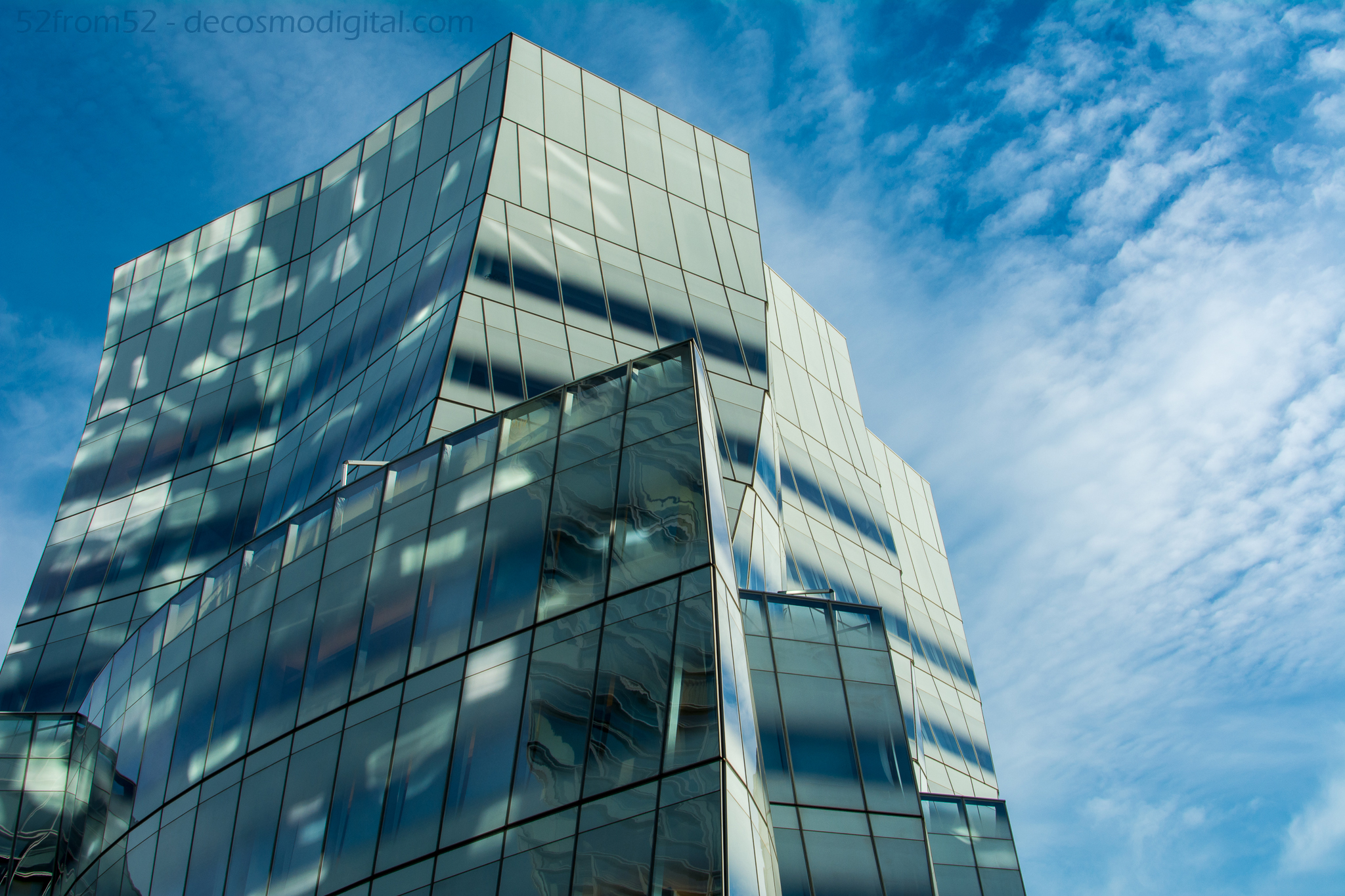
Since taking the picture for my second blog “A Day of Reflection” I’ve been drawn to taking more and more reflections shots. After a crazy/good weekend and with a very busy week looming ahead of me I thought Monday would my only opportunity to get a picture this week and an ideal time for a second “Day of Reflection”. The title of this week’s blog is just as much a reference to a day of relaxing outdoors as it is to the kind of picture I took. When things get busy it’s even more important for me to set aside one day to clear my mind and of course get a picture for this blog. Walking around the city and enjoying the fall weather is one of my favorite ways to relax. Add a camera to the mix and it’s a hard afternoon to top.

Setting out the target destination for my afternoon was Chelsea, more specifically the area surrounding the Chelsea piers. Knowing there were a couple of parks, some interesting buildings and of course the waterfront/piers in the area Chelsea seemed like the perfect spot. After popping out of the subway on 14th street I began my short journey towards the water. While on my way to my picture’s destination I unknowingly passed the Chelsea Market and a bar called “The Tippler”. Not to get off topic but I circled back to both locations on Wednesday (not for pictures) and if you haven’t been to either I highly recommend checking out both, very cool!

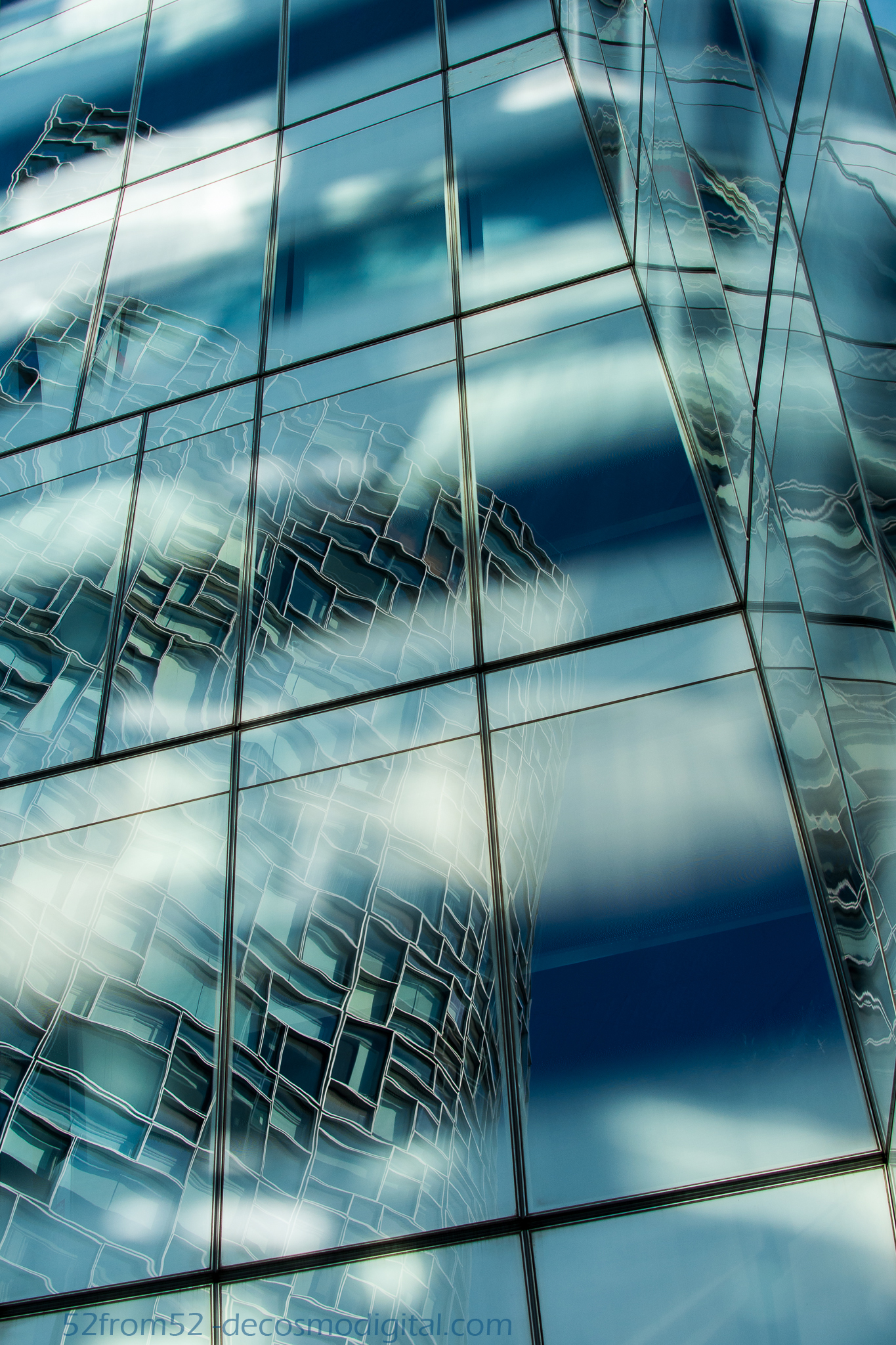
After a walking around for a little I eventually arrived at the Chelsea Piers and immediately saw what would be the subject of this week’s blog. There are two buildings right across from the Chelsea piers which are architecturally awesome. One of the buildings is the main office for IAC which is an internet media company and the other is ‘trendy’ residential building called Nouvel. Both buildings are incredible so it was difficult to decide which building should be the focus of my picture, that’s why I decided a reflection shot was my best option…and so the challenge of getting this week’s shot began

IAC Building

IAC Building

Photography concepts:

As mentioned in the this week’s picture description my goal was to get two buildings in one shot. Capturing multiple buildings would have been a much easier task to accomplish if I was using a wide angel lens, or even a zoom lens from a distance. As you hopefully have come to know by now this blog revolves around me shooting with my 35mm lens, which due to my crop sensor provides around a 50-52mm perspective. Most people don’t know what these ‘mm’ measurements equate to so let me put it into perspective once more, a camera phone is around a 30-35mm perspective. When shooting with a camera phone I’m sure you’ve had limitations when it comes to fitting everything in the picture. Now imagine shrinking that window by about 40%. Yes maybe now you understand why capturing buildings or wide scenes is so challenging, here is where using reflections comes in. Through the use of reflections you can capture larger images in a smaller window.

An alternate reflection shot

An alternate reflection shot

The first challenge in capturing this week’s reflection picture was finding an angle that provided a clear reflection of the Nouvel building. Once I found the right angle the second challenge was determining what lines I should use to level off my picture. I decided to align my picture on the Nouvel building. Once I had my angle and point of reference to level my shot the third and last challenge was messing around with settings to find the best aperture for capturing a crisp image. I took the same picture in an array of apertures to make sure once it came time for editing I had options. While shooting with a DSLR taking the same picture using different settings is the surest way to insure you get a great picture. When you’re reviewing pictures in the LCD screen on the back of your camera it isn’t always easy to identify one that’s going to look good on a big screen. This concept is commonly referred to as “bracketing” and is one of the most important photography lesson’s I’ve learned thus far. The concept of bracketing is applied to almost any camera setting, it’s most often use is probably when it comes to exposure or light settings. Below are a couple articles on bracketing if you’d like to read more about how to apply this concept. In the future I’m going to attempt to use bracketing and merging pictures to capture a picture that contains high and low exposure areas so stay tuned!

Bracketing Articles

http://www.nikonusa.com/en/Learn-And-Explore/Article/gblbwrp6/exposure-bracketing-the-creative-insurance-policy.html

http://www.digitalcameraworld.com/2012/11/13/bracketing-explained-what-you-need-to-know-about-maximising-detail-in-your-photos/

Nouvel’s Site

http://www.nouvelchelsea.com/

Getting a-head

Picture Specs: ISO 200, 35mm, f/5, 1/30 sec

Picture Specs: ISO 200, 35mm, f/5, 1/30 sec

Week 10 (10/6/2013 – 10/12/2013): My Apartment, Hoboken NJ
Picture taken on 10/10/2013 at 4:53 PM

Picture description:

In life it’s always better to get ahead.  Getting ahead was the catalyst for this week’s picture/concept.   As I’m gaining more experience and exposure in the photography world, more opportunities are presenting themselves.  One upcoming project is going to require me to take a lot of indoor pictures and possibly product/macro types of shots.  In an effort to prepare (get ahead) for this future project, and to explore more areas of photography I decided to experiment with “studio” photography.  Now I don’t have a studio or access to one so the best I could do is purchase an at home alternative to allow me to take some small scale pictures.  Luckily one of the best companies to buy photography gear from has a storefront in New York City and not too far from my office.  I’m of course talking about B & H.  After doing some research online about what I should get I took a trip to B & H to check everything out in person.  I spoke to one of the employees who recommended a duel light set up which would have been both bulky and expensive.   I decided his suggestion wasn’t the route I wanted to take and ended up settling on the “MyStudio” portable photo studio with built in lighting.  It came at a reasonable price and it seemed to be the perfect size to be functional in my apartment.

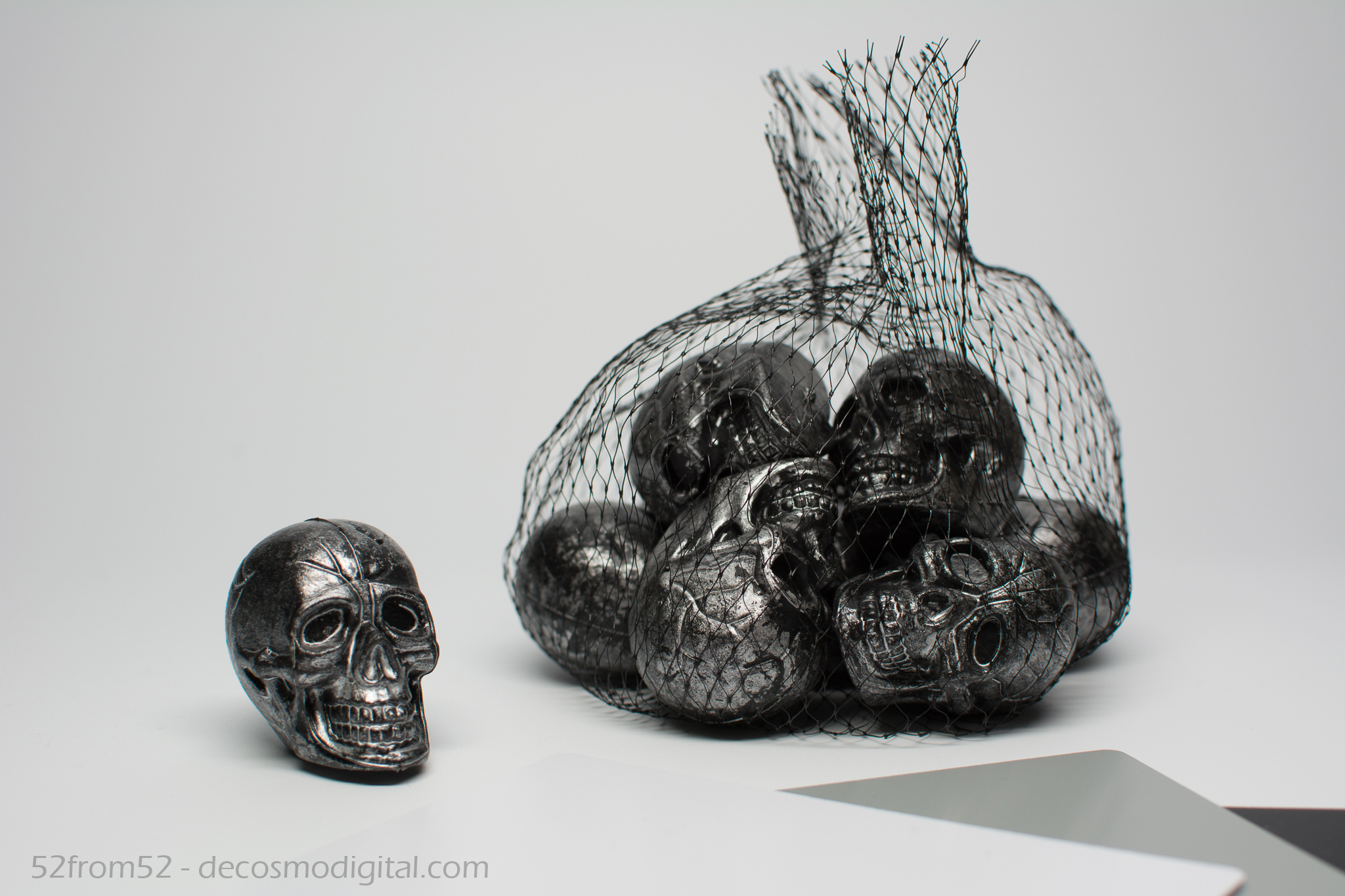
Setting up “MyStudio” was pretty quick and easy.  Of course it helps that I’m a handy man (not by trade) but I feel like most people would be able to put everything together in under 10-15 minutes.  Once everything was set up it was time for the fun to begin.  Per my brother “anything is cool if you’re a good photographer”  at least in terms of macro photography so I took that as a challenge.  I began going through my room and photographing almost anything that would fit in “MyStudio.”  Although my brother was right, not everything that I took a picture of could easily tie into a post.  I decided to find something a little more relevant.  My “getting ahead” philosophy (along with Halloween being around the corner) is what drew me to skulls (heads) that are featured in this week’s picture.

Photography concepts:

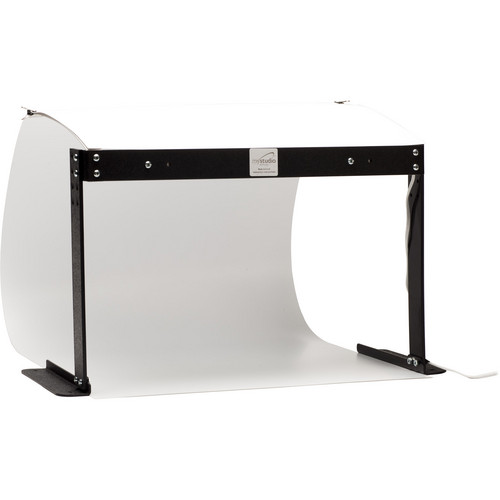
One big difference between this picture and those of past week’s was I needed a decent amount of equipment to make this happen.   For starters I needed the “MyStudio” which I would recommend to anyone looking for a small at home studio option (link/picture below).  Next I needed a tripod since with macro/studio photography sometimes you have to take longer exposures to capture more light and you really need to line everything up with precision.  I probably could have gotten away with not using a tripod but I already had a good one so there was no reason to not.  Another key tool you need while doing studio photography and any other indoor shots are white balance cards.  I’ve mentioned white balancing before but this week it was really key.  When you’re using a white balance card you usually take a reference shot and either tune your camera into that setting or use the reference shot as a guide for setting all your white balance in editing.  This week I decided to leave my white balance cards in the picture so you could get an idea about how I used them.   The last and most obvious (other than my camera) thing that I needed was a subject.  In the past I found real life subjects to photography, while this week I had to find and place my subject.  Having the freedom to get creative was nice but also very challenging.

MyStudio; Taken from BH's site (link to product below)

MyStudio; Taken from BH’s site (link to product below)

The main challenge about having “creative freedom” was positioning my subjects and relationally lining up my camera.  When you’re working on such a small scale the slightest adjustments to your camera’s angle or the location of your subject changes the entire dynamic of the picture.  Using this week’s picture as an example.  You’ll notice that the single skull and the bag of skulls are a little offset with the single skull being further up in the picture.  I positioned the single skull forward so it was larger in the picture but I had to push the bag back to get it in the full frame.  Once I put the two subjects on different planes, in relation to my camera’s lens, it forced me to use a smaller aperture.  If I had shot this picture with a f/1.8 instead of f/5 the single skull would have been in focus and the bag blurry.  Even with f/5 you can already start to see some of the blur in the back portion of the bag.  Based on what I’ve read, along with my own experience with wider apertures (smaller f numbers) the plane of focus becomes very thin.  What this means  is only the things that are on the same plane as your subject will be in focus.  The smaller the aperture the deeper the in focus plane gets.  I haven’t done enough reading to explain the mathematics behind this focal plane concept but I feel like this picture was an easy way to demonstrate the concept and it’s challenges.

There is still a lot more to learn about indoor shooting so this topic might get featured again in the coming weeks. Let’s just say for now this is to be continued…

BH Link for “MyStudio”

http://www.bhphotovideo.com/c/product/727653-REG/MyStudio_PS5_PS5_PortaStudio_Portable_Photo.html

Searching for…

Picture Specs: ISO 320, 35mm, f/7.1, 1/500 sec

Picture Specs: ISO 320, 35mm, f/7.1, 1/500 sec

Week 9 (9/29/2013 – 10/5/2013): St. Petersburg Pier, FL
Picture taken on 10/1/2013 at 4:04 PM

Picture description:

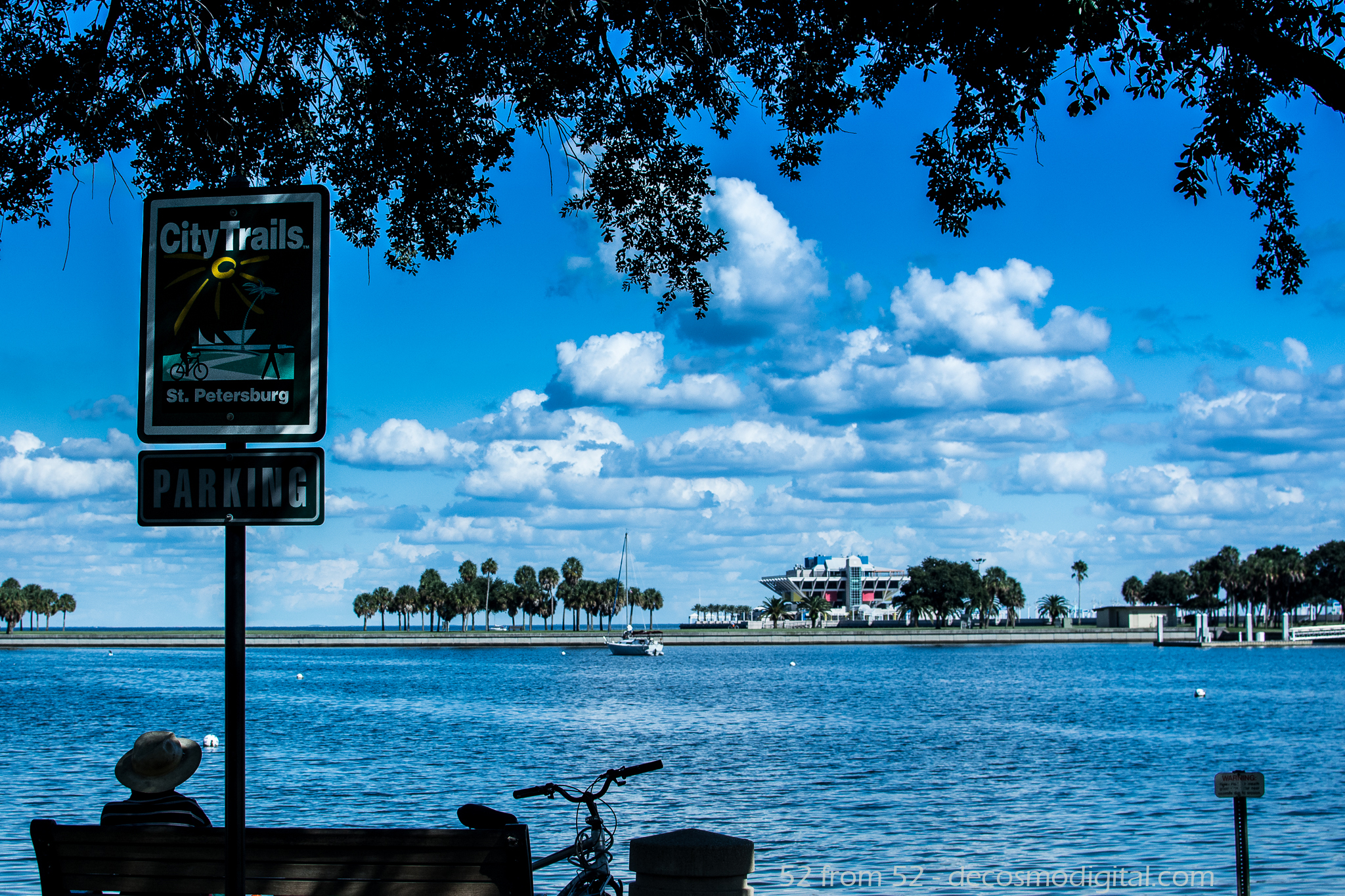
Everyone is searching for something. Like most weeks one of the things I was searching for was an interesting picture to write about. In past weeks I had a set plan or some general idea about what I wanted to shoot, but my only plan for this week was to leave it open ended. The beginning part of my week was spent down in Florida visiting my insanely awesome family. My hope was that while in Florida something interesting would present itself and that my Nikon would be close or in hand to capture the moment. As one day rolled into another my camera stayed on the bench while most of my time was spent running around with my cousins doing what we do, “You don’t even know!” By the last day while my cousin Courtney and I were killing time before my flight we decided to grab a bite and hit the St. Petersburg Pier or as they call it “the pier” to see about getting a picture.

Once we got to the pier one picture instantly jumped out at me. With the thought of how everyone is “searching for” something in the back of my mind, the picture that caught my attention was this man sitting on a bench peering out at the pier as it jutted out into the deep blue bay. To me it looked like he was simply enjoying the beautiful view but also deep in thought, perhaps searching for an answer to something?

Another reason why this picture caught my eye was because this man’s spot reminded me of my own back up North. If you recall my post from week one I featured my favorite bench with a view. Chances are if Florida was my home this or one similar to this would be “my bench.” I’ve found that setting aside time to be alone in your thoughts is mentally one of the healthiest habits to have. Things move fast, as do people so if you don’t carve out some time to slow things down for a little you’re going to burn yourself out, at least that’s my philosophy. Not everyone has a bench, but I encourage you to find your equivalent. This nameless man and I have found our bench, the only remaining question is will we find everything else we’re searching for?

Photography concepts:

With 9 weeks in the books more of my focus is shifting towards the composition of my picture rather than the technical aspects such as exposure. Setting the right exposure is by choosing the correct settings is still key but it’s becoming more second nature for me. Using this week as an example, once I picked my spot there were two apertures I wanted to try for this picture. One was f/4 since this seems to be the “sweet spot” for my lens, and the other was something around f/7-8 to get most of the picture in a crisp focus. In the end f/7.1 looked the best since it kept everything in a nice focus, with the priority going to the sign in the foreground. In past weeks more of my time might have been spent finding the right exposure but thankfully this week I found it quickly and could put more thought into the elements of my composition.

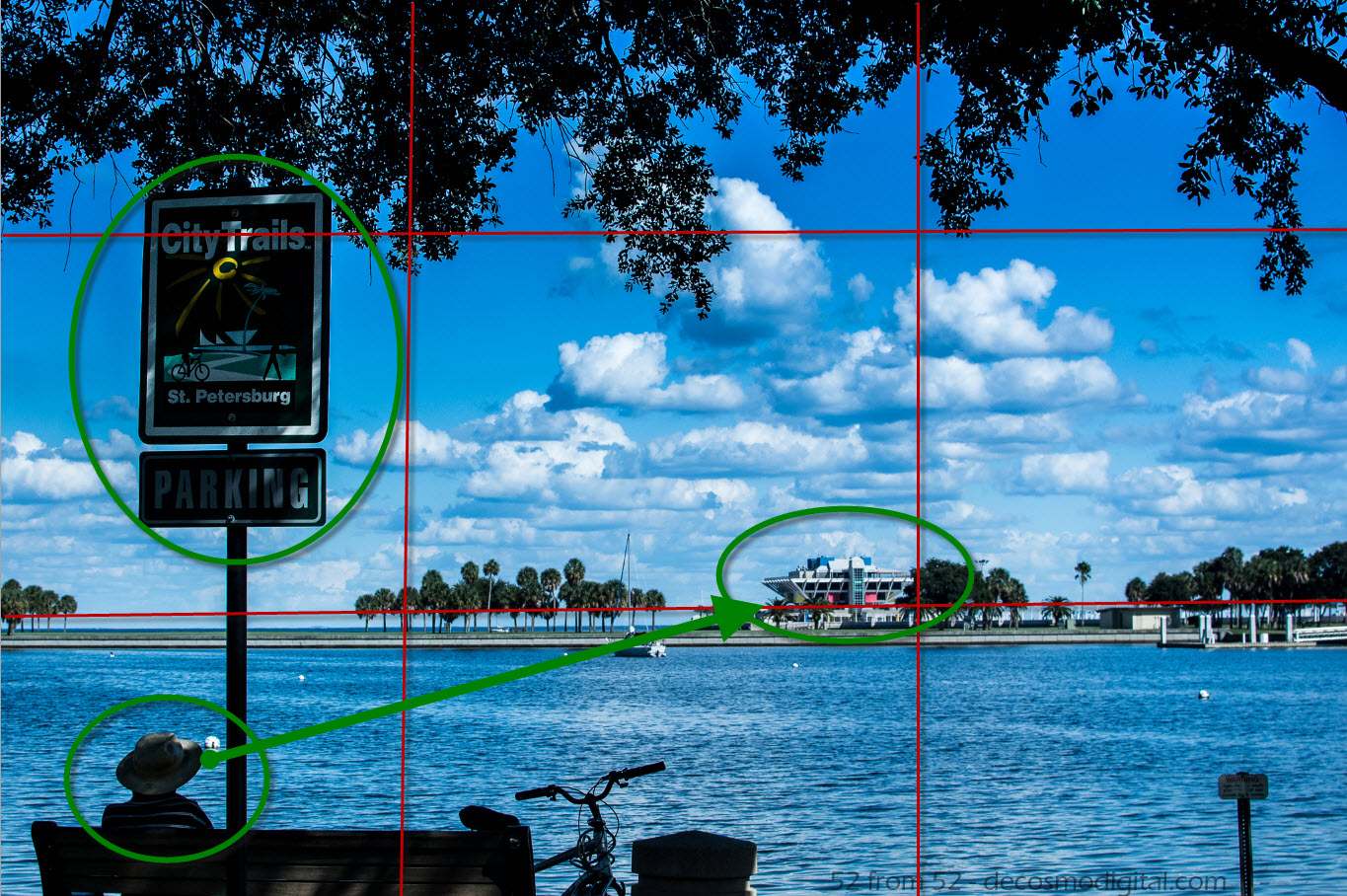
Other than the beautiful clouds and water there were three things that I wanted to emphasis in this picture. My main subject was the pier with my secondary subject the man on the bench. Luckily these two subjects complimented one another in that the man is looking out towards the pier. This leads the viewer towards following the man’s gaze out into the water towards the pier. My third subject was the sign which had the main purpose of highlighting the location of my picture, St. Petersburg.

Framing the shot

Once my subjects were chosen it was all about lining them up, which of course brings back the concept of the rule of thirds. You’ll notice that two of my subjects are in the left thirds of the picture with my third and main subject (the pier) at the lower intersection point of the right two thirds. Putting the pier in its own two thirds was so my main subject had the prime location in the photo and so the viewer could see the area surrounding it. The last framing element I went for was breaking up the picture top to bottom by putting the water in the lower 1/3, the sky in the middle 1/3 and the tree branches in the top 1/3. This naturally framed my main subject (the pier) in-between the branches and the water. My feeling was that framing the picture like this gave it a tighter feel rather than a wide open feeling one would have felt if the sky took up 2/3+ of the picture. My goal was that the combination of all the framing elements would make the viewer feel like they were looking through the same natural window as the man on the bench. I hope it worked!

Getting Negative

Picture specs: ISO 500, 35mm, f/4.0, 1/4000 second

Picture specs: ISO 500, 35mm, f/4.0, 1/4000 second

Week 8 (9/22/2013 – 9/28/2013): Flatiron building, corner of  23rd/5th NYC
Picture Taken on 9/25/2013 at 4:58 PM

Picture Description:

No, don’t worry I’m not going on any kind of negative rant in this week’s post.  If you want to understand the “negative” reference in the title you’ll have to read the photography concepts!  Enough on that, time for the story behind the picture.

I was reminded about a very valuable lesson this week, that lesson being that you really can’t force things.  As usual I had a plan for this week but by Tuesday I realized my plan was pretty much a wash.  The plan was to get a picture of or around the United Nations building.  The reason I chose this week was because it’s the annual United Nations General Assembly.  Most people have no idea about when the General Assembly happens let alone the chaos that happens in the area surrounding the UN.  I work not too far from the UN so each year I get a front row seat to the insanity.  SWAT cars, Secret Service, hundreds of NYPD officers, and countless diplomats converge on my little east side nook.  What I wanted to do was get a picture that in some way captured the madness.  On Monday I scouted the surrounding area to see if there were any good pictures that caught my eye.  Due to all the added security I couldn’t get close to the UN building so I knew I’d have to get some kind of distant shot.  The only idea I could think of was a sunrise picture since the UN is right on the water.  Sunset shot easy right, yes…on any other week!

It wasn’t until Tuesday morning when I brought my camera into work with me that I realized the flaw in my plan.  With so many cops and security personnel around the second I took my camera out all eyes focused on me.  Why is he photographing the UN?  Why is he wearing a black coat?  Why is he walking down that street?  Why is he looking around in such an odd way?  These are all of the questions I could almost hear getting asked as I felt the burning stares.  After a few short minutes I decided to move locations to the waterfront on the East river, bad idea. Once I got to the waterfront I saw police boats circling which seemed to immediately fixate on me.  As one large boat headed in my direction, I quickly threw my camera into my bag and slowly walked away.  In my head I had this sudden fear that some kind of unmarked car was going to zoom up, grab me, and take me away for hours of questioning.  At this point I said you know what I really don’t want to get arrested this week, I’m going to get a bagel and call it a morning.

That afternoon as I thought about what unfolded in the morning I realized even though I really wanted the UN picture this week, now isn’t the best time, there is always next week.  Giving up on something like this is difficult for me.  Once I see something I want I go for it but as I said  earlier, this week I was reminded sometimes you can’t force things you just have to be patient and wait for the right time.

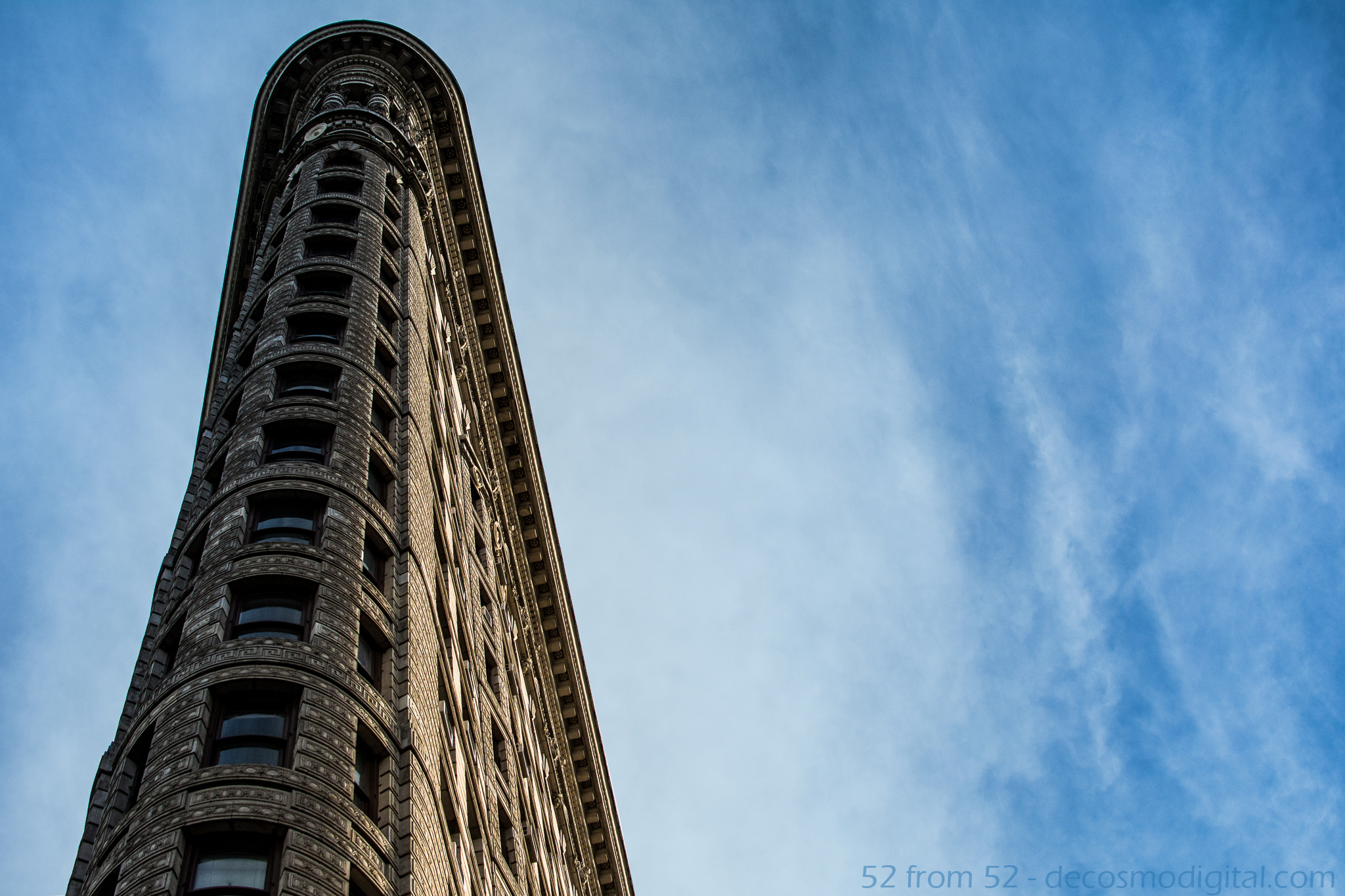
Once I came to terms with holding off on the UN idea I decided that I would take a trip to the flatiron building to see if I had better luck without all the piercing police eyes.  Prior to this week I had only seen the flatiron building from a distance or very briefly up-close while driving by.  The building is quite the scene in person and can make you a little dizzy when you’re standing right next to it looking straight up.  Luckily I was able to conquer the dizziness and get this week’s shot, hopefully you like it!

Photography Concepts:

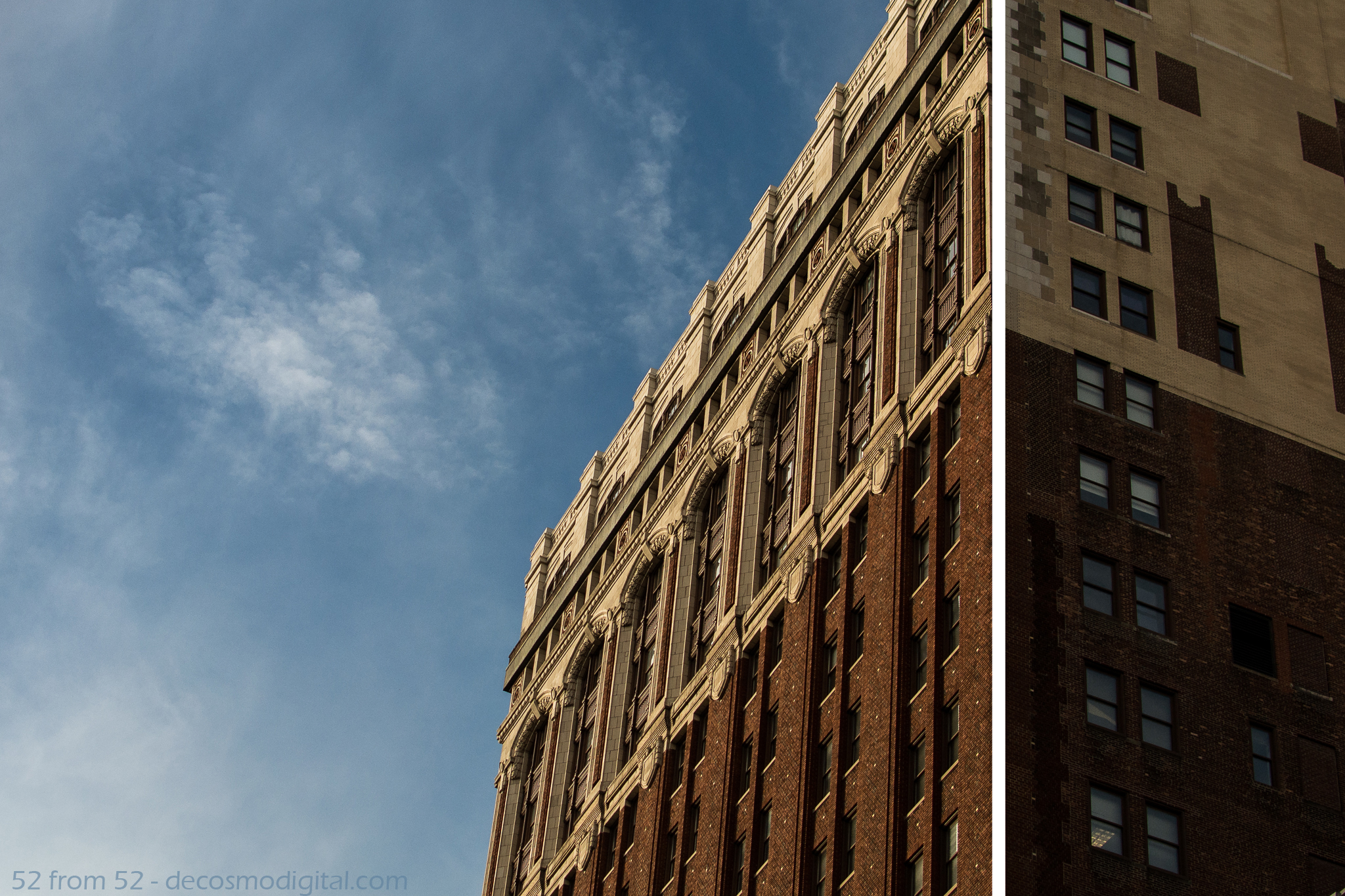
Photography wise what I learned this week is “getting negative” isn’t a bad idea, let me explain.  As I continue to read about the concepts of photography one term that’s come up a lot when referencing a pictures composition is “negative space.”  Based on everything I’ve read negative space is the area surrounding your subject (which is positive space).  It seems logical enough right?  I’ve seen that in some photos people literally fill the negative space with well nothing.  What this does it it really emphasizes the subject.  In my case my subject was the flatiron building and my negative space was filled with the nice blue sky.  When I first started taking pictures if I took a picture where half of it was empty I’d probably think about cropping it down to eliminate that space.  What I’ve now learned is if used correctly the empty “negative” space is a nice tool to put in your composition toolbox.

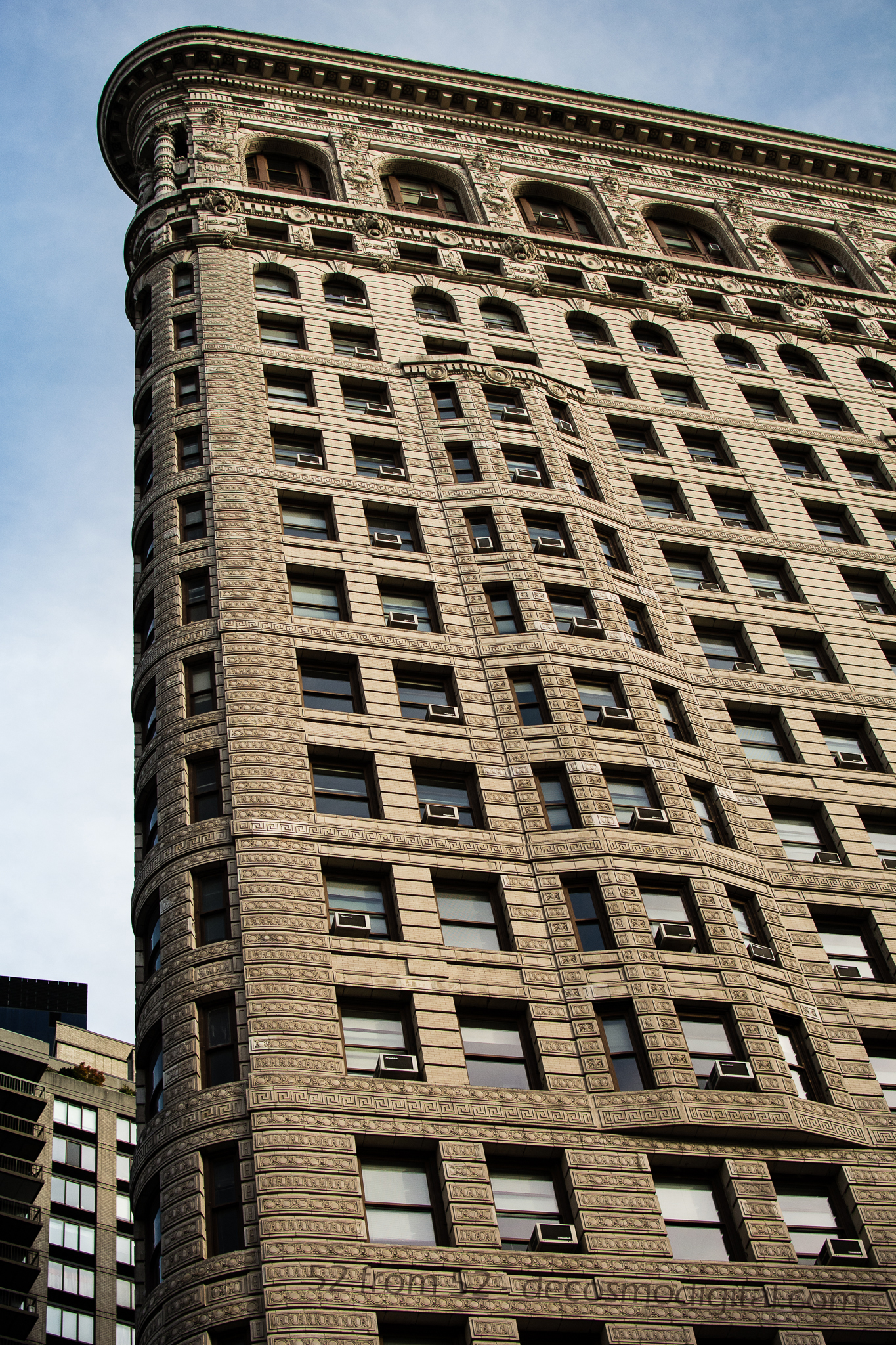
An example of a picture where there is no negative space.

An example of a picture where the subject takes up most of the frame

One trick I learned this week while getting myself dizzy from looking up for too long was how to line up my pictures better.  In a lot of the pictures I’ve previously taken of buildings while looking straight up I noticed that the picture always seems tilted.  The way I lined the picture up or saw it in real life didn’t translate well to the composition of the photo once I reviewed it at home.  While I was shooting this week I tried to choose a line or lines in the building that would level things out when I looked at the picture later on.  It felt odd while I was taking the picture but my results were a lot better. For example in the below picture I chose the corner line between the two sides of the building to line up my shot.  It’s hard to give some kind of formula for choosing the right line, but it’s something I’m going to try and pay closer attention to in the future.

Blog_8(final)3

Rushing to/Rushing from…

ISO 400, 35 mm, f/3.2, 1/80 second

ISO 400, 35 mm, f/3.2, 1/80 second, -2 stop exposure

Week 7 (9/15/2013 – 9/21/2013): Hoboken Terminal, Hoboken NJ
Picture Taken on 9/17/2013 at 6:55 PM

Picture Description:

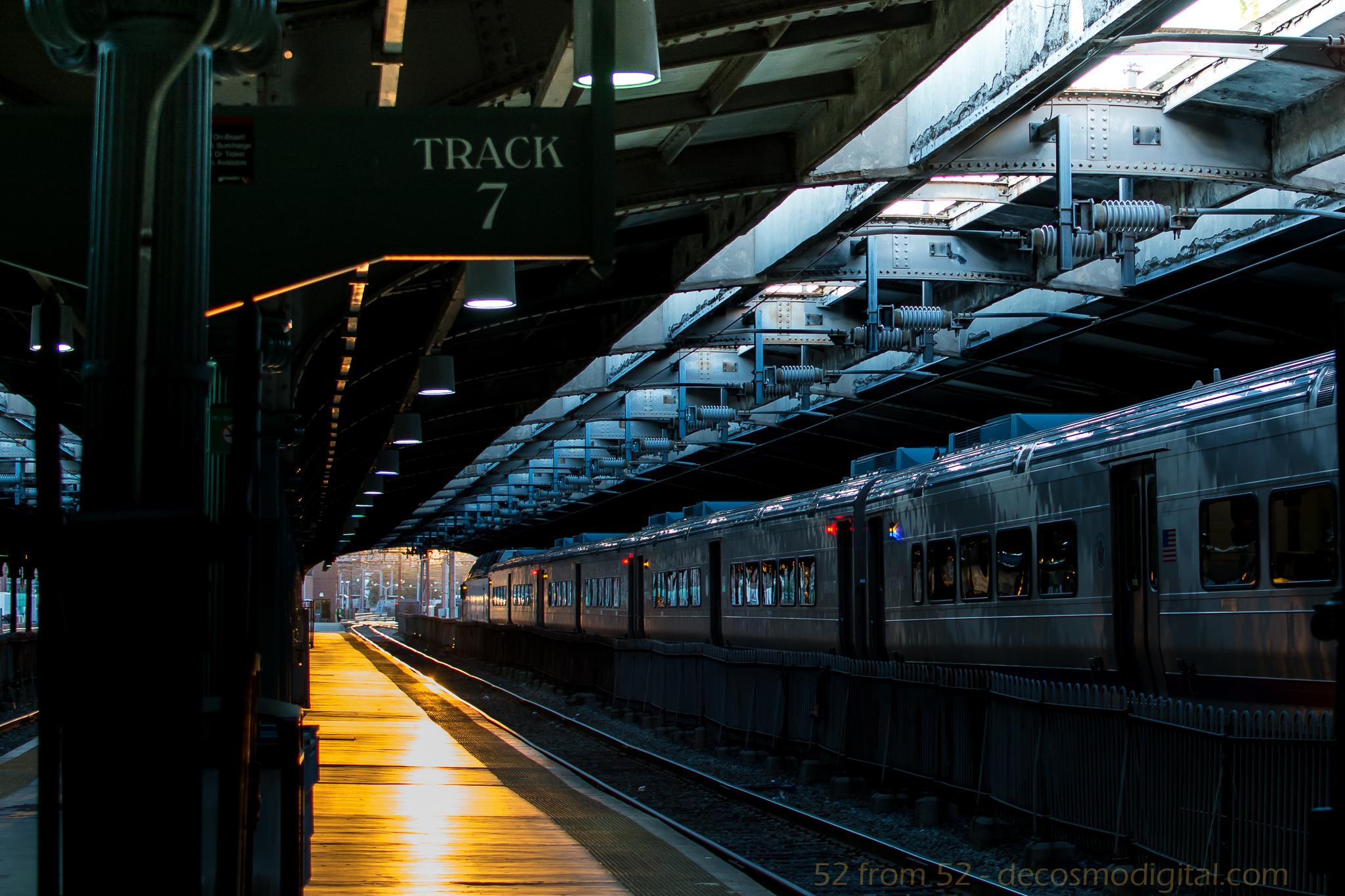
Have you ever noticed that almost everyone at train stations are in a rush? I have to admit in most cases I’m one of those people. Think back to your last time at a train station, chances are you were either rushing to or from your destination and paid little attention to your surroundings. In the rare instance (or maybe not so rare depending on how punctual you are) that you miss your train the thought of waiting for the next one can almost seem like a prison sentence. I’m no stranger to mass transit, I’ve been taking it for years and I’ve become all too familiar with the scenarios I just described. I have often wondered about all the little things I’ve missed over the years while rushing around or overlooked while being frustrated by some unplanned circumstance such as missing a train. Maybe I missed out on an interesting conversation with a passing stranger? I might have trampled right over a rare coin laying abandoned on the ground or perhaps walked past a person that needed my help with something as simple as directions. You would be surprised what you notice when you actually take the time to pause, think and observe. This concept of how people rush through train stations and life in general is what gave me the idea for this week’s post.

This week I decided to try and observe things, people and places I regularly might overlook. I’ve been riding the bus with my headphones out, phone in my pocket and head up. I made it a point to sit outside for lunch rather than eat at my desk on the computer. Besides the little day to day changes I also decided to take a trip to the train station, not to catch a train but give a photographic demonstration of what you/we often miss out on. My plan was to get to the Hoboken train station just before sunset because I knew the station was aligned East to West so there would be a good sunset down the tracks.

Upon arriving at the station it was exactly how I imagined it. I got to the station around 6:45 which is the tail end of rush hour but the station was still very busy. Crowds of people were weaving in and out of one another, some on their phones while others just with this blank look on their face. As I tried to shuffle between the waves of people to line up my shot I got tapped on the shoulder, “Can I help you?” I heard. My unusual behavior caught the eye of a police officer, apparently being the only person not rushing looked a little suspicious . I politely replied no (didn’t want to get arrested) and said I was just trying to get a sunset photograph while offering to show my pictures as proof. The police officer looked dumbfounded but said okay and walked away. I spent a couple more minutes fighting the crowd trying to get the best shot the whole time noticing that literally no one was seeing this awesome view. One person stopped and I thought they were checking it out, but it turned out they were just looking for a train time. By the end of my little endeavor I felt validated about my rushing theory and accomplished that I was able to get the the exact picture I had in mind. One oddly coincidental aspect of this photo, this is my seventh blog and somehow I ended up getting a photo of track 7. This wasn’t planned but sometimes the best things aren’t…

Photography Concepts:

I applied a couple of the basic composition techniques I’ve talked about in my previous posts to deliver what I felt to be an interesting picture. The rule of thirds and leading lines are the two most main composition concepts at work in this photo. Instead of going for a symmetrical picture and having the track split my picture down the middle I went with having it take you right to left and right out of the station, or is it leading in? I felt like this picture can give the feeling that you could be waiting to leave, or you just said good-bye to someone leaving you with nothing but an empty track. Basically when someone looked at the photo I was hoping they would almost ask the question, am I coming or going, am I rushing to or rushing from?

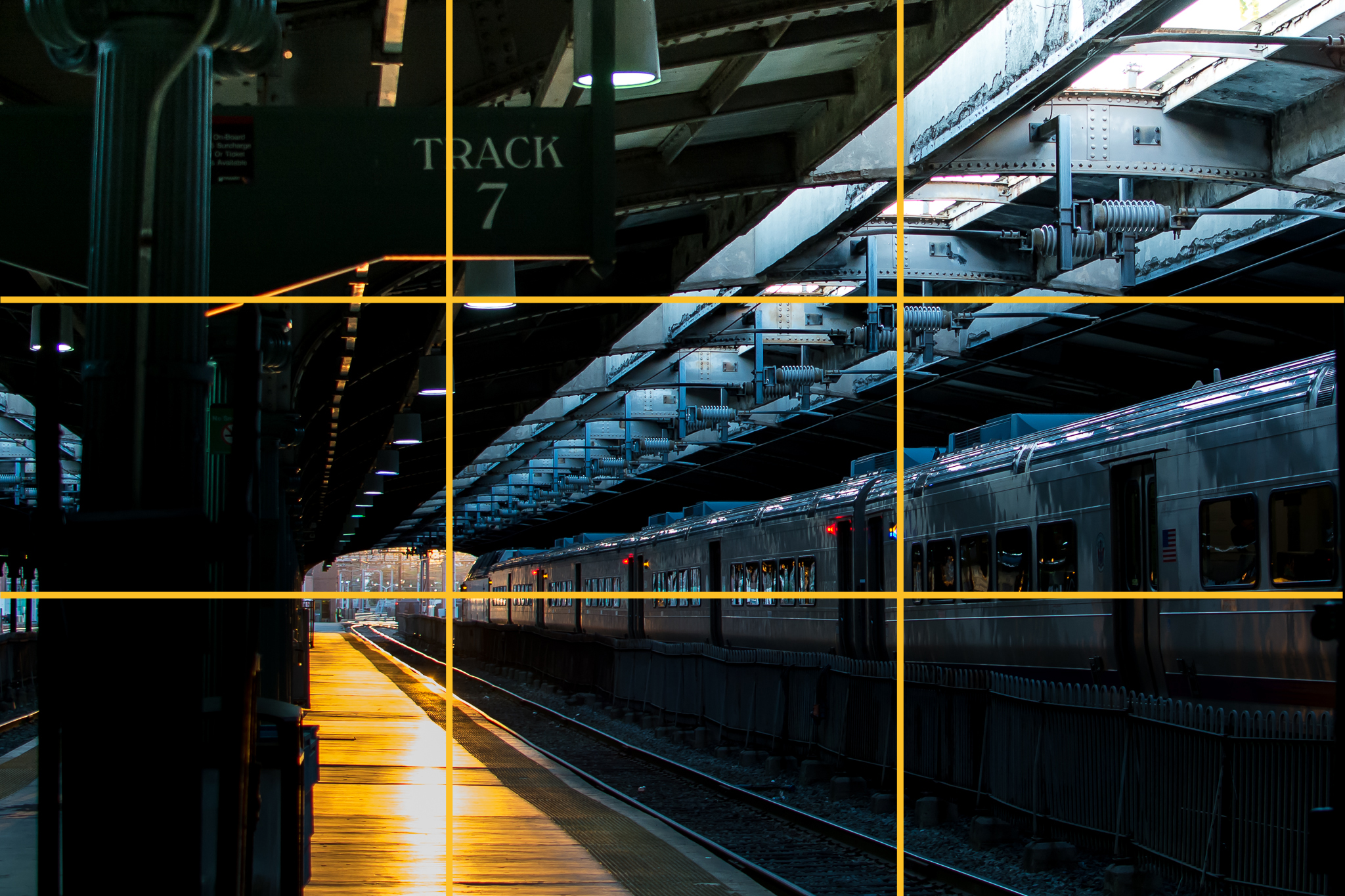
Ruleofthirds2

The rule of thirds gave less of a message and was more of the framework for lining everything up. I put the train right on the bottom third intersection line and did my best to have the exit for the station at the intersection point of the bottom and left thirds lines. The last two main pieces of the picture were the track sign and the empty platform, I lined both of those up along the left thirds lines. You might be saying to yourself wow you gave lining up a lot of thought. Surprisingly I really didn’t think too much while framing everything. Over the past couple of weeks as I have taken more and more pictures along these guidelines I’ve started to do it automatically. I’ve noticed a big difference in the pictures I’ve been taking, and judging by peoples comments they have too. Don’t take my word for it, pay more attention to lining up your pictures and see what you think or better yet what other people think.

Night Light

ISO 100, 35mm, f/8.0, 4 sec

ISO 100, 35mm, f/8.0, 4 sec

Week 6 (9/8/2013 – 9/14/2013): Shipyard Marina, Hoboken NJ
Picture Taken on 9/9/2013 9:11PM

Picture Description

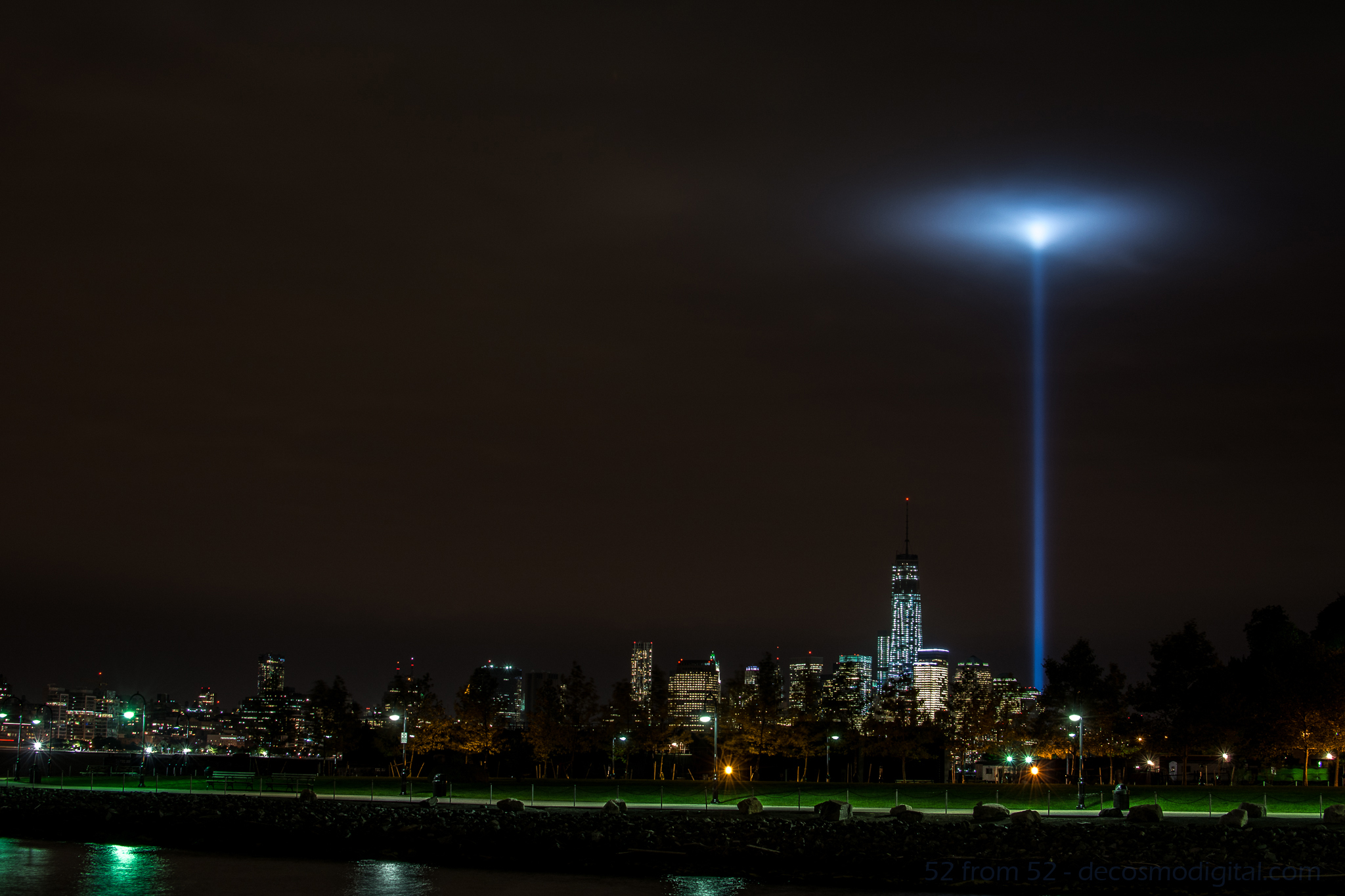
Going into this week my goal was to create a multiple exposure photograph or light trail night picture.  As a possible secondary option I bookmarked the possibility of photographing the freedom tower.  On Monday night I went out around 6ish to mess around with my new Nikon ML-L3 remote.  I was aiming for either a double/triple exposure of the Hoboken ferry or some kind of sunset shot.   After messing around for about an hour I went back to my apartment to eat some dinner, review my pictures, and wait until the sun was totally down so I could try for a night picture.  Unfortunately after reviewing the pictures on my computer none of them worked out as I planned so I was going to have to go back out for the night shot.

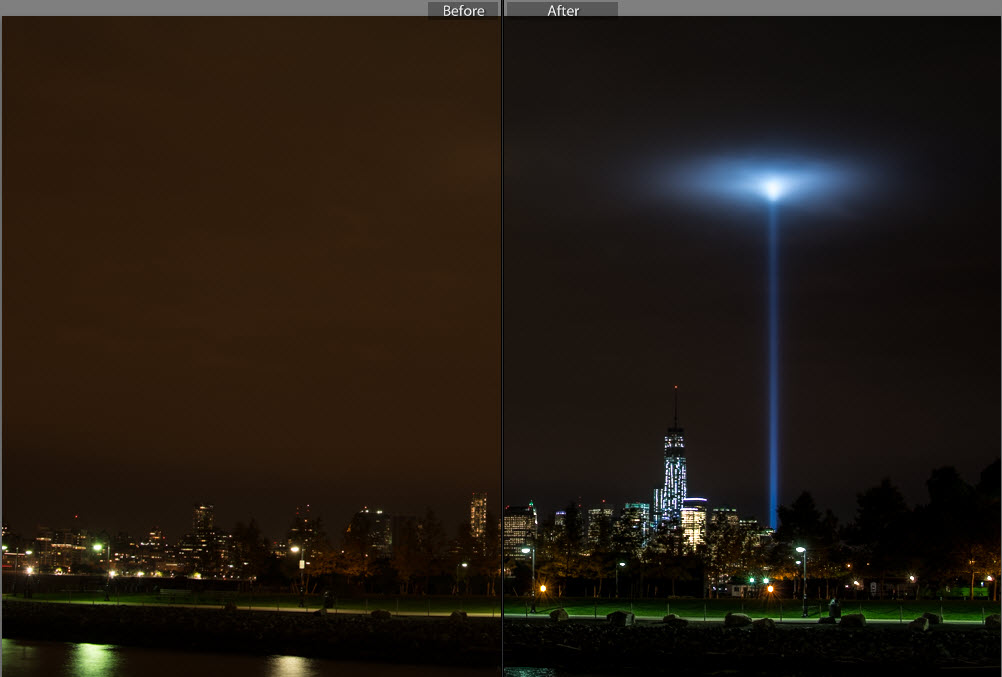
After dinner as I stepped outside of my apartment my eyes were instantly drawn to the distant southeastern skyline.   What I was looking at was simply amazing, the 9/11 memorial lights were getting trapped in some low thick clouds and forming this surreal spherical glow.  All of my other night picture plans went out the window at that point, I had to take a picture of this unique occurrence.

After taking the picture I thought it was good (not great) but didn’t want to use it as my picture for this week.  As I do with most unused pictures I posted it up on Facebook to share with my friends.  To my surprise this picture got more activity than any other one I’ve posted.  Coming up with a picture to top this one, at least this week would have been hard so in the end I decided to use this picture.

 Photography Concepts 

To get this picture I had to apply many of the tricks I’ve learned over the past couple of months. In some of my previous long exposure pictures I noticed a slight camera shake.  To prevent getting shaky images I’ve moved towards using either a 2 second delayed shutter release or in this case a remote.  Next I regularly use a UV filter on all my camera lens to prevent any wear and tear.  Over time I noticed that at night using a filter increases the amount of light distortion and bleed, so prior to this picture I removed the UV filter.  The last two keys to this photo, which I’ll talk about in a little more detail, are the exposure settings I used and editing in Lightroom.

The exposure I used was -2 (stops) which for anyone that doesn’t know, it’s an underexposure.  The reason I underexposed was because after taking other nighttime city shot I’ve noticed that with so many lights from all the buildings my pictures tend to get overexposed.  There are lots of negatives with overexposing, in terms of my city pictures the most noticeable is the change in the sky color.  After messing around with different exposures I’ve settled on -2 for my go to exposure setting.

Now it’s hard to describe all the different tweaking I did in Lightroom but one of the main fixes was the white balance setting.  I forgot my white balance cards when I went out to shoot this picture so I had to do it after the fact.  I also made some moderate adjustments to the Highlights, shadows, whites, blacks and clarity to get the picture to look like what I saw in person.  If you want to learn about Lightroom I highly recommend going on youtube and watching some tutorial videos.  There is so much information out there to support learning photography (and most other hobbies) it’s just about finding it.

Before and After Editing in Lightroom

Before and After Editing in Lightroom

Since I originally did not want to use this picture let me quickly explain why and what I could have done better.  For starters if I remembered my white balance cards I would not of had to do so much editing in Lightroom.  I rather get a good picture in camera rather than edit it especially for this photoblog. I also wasn’t happy about my composition, the green in the picture is really nice but I was made I cut off some of the left side of the peninsula that is shipyard park.  I wish that I would have stepped back another 30-50 ft to get more into the picture.  Last I wish I found something interesting to put into the foreground of the picture, it just makes for a more interesting picture.

Article about Exposure
http://bit.ly/1eOEzt8

Lightroom Video’s
http://bit.ly/140WqbT
http://bit.ly/1ddxPTS

Never Forget

ISO 160, 35mm, f/ 2.5, 1/500 sec

ISO 160, 35mm, f/ 2.5, 1/500 sec

Week 5 (9/1/2013 – 9/7/2013): 9/11 Memorial, New York City, NY
Picture taken on 9/5/2013 at 5:44 PM

Picture Description

In a less than a week 12 years will have passed since September 11th, 2001 and prior to this week I never visited the hallowed ground that was the location of the World Trade Center towers.  I have wanted to pay my respects by visiting the grounds for some time now and this week I finally made the time to visit the 9/11 memorial.

As expected prior to entering the memorial you’re paraded through an array of security screenings and lots of twisting alley ways.  When you finally get into the memorial area it’s a surreal feeling especially when you think about the significance of the ground you’re now standing on.  So much that has happened over the past 10+ years has been a result of what happened there on that fateful day.  The events of 9/11 will forever remain in the forefront of my mind.  As with most Americans, especially those that live in the New York area, I can vividly replay much of the day in my mind as if it was only yesterday.  I was fortunate to not lose any loved ones through the tragic events and it’s hard for me to even fathom what those that did had to go through, and still do.  As I walked around I tried to do so respectfully since I’m sure among the crowd there were at least a few visitors that had lost someone.   The reflecting pools are both architecturally beautiful and symbolically somber.  The pools each take up about an acre of space and the perimeter of each pool is lined with the names of those that lost their lives.  The relationship you can draw between the magnitude of the pools and encircling list of names is powerful and very sobering.   While walking around you randomly come upon names with flowers, flags and other items placed or wedged into the cracks of letters.   I don’t know how often flowers and such are removed but my guess is that the presence of one means someone placed it there that day or very recently.  During my walk around the North pool I noticed that someone had placed a flower on a loved one’s name just below the World Trade Center heading.  I thought the flower with the reflection pool backdrop would make for a meaningful picture.

blog_5-final(2)

I hope after reading this you too go visit the memorial to pay your respects and experience this all for yourself.  I’d also like to say if anyone is reading this and lost a loved one, you have my deepest condolences.

Photography Concepts 

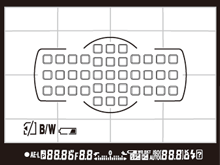
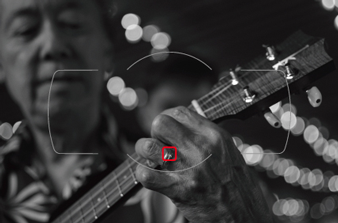
This picture was very straight forward, unlike last week nothing was moving so I just line everything up and fired away.  As I take more and more pictures I’m beginning to learn what the ideal settings are for specific ‘looks’.  This picture for example, I wanted to emphasize the flower, names and obviously “World Trade Center.”  If you read my first blog you might be able to guess one of the settings I used to get the blurred background.  If you said wide aperture, you were correct!  I used an aperture of f/2.2 to blur out the reflecting pool.  The second and main part in capturing this picture was utilizing my camera’s focus points.  I used a single point auto-focus to mainly to make sure “World Trade Center” was properly focused but oddly enough there is more effected with using focus points than just ‘focus’ so that’s what I’m going to talk about.

Nikon D5200 Focus Points - Taken from below Nikon Website

Nikon D5200 Focus Points – Taken from below Nikon Website

When it comes to “auto-focus” my Nikon D5200 has 4 different focusing modes but for now I’ll just talk about the one I used. I used single point auto-focusing for this picture which is what I use for most of my pictures. For anyone that doesn’t have a DSLR you might be unfamiliar with the term focus points.  They’re exactly what you’d think they are, selectable focus areas I see when looking through the lens.  Similar to what you see on standard camera’s or camera phones, however on my camera they’re not totally free moving.  For example, on most camera phones you pretty much touch anywhere on the screen and it uses that as the main focus point.  On a camera such as mine I’m limited to 39 focus points.  The really high end DSLR cameras (e.g. Nikon D4 – 51 focus points, Canon EOS 5D Mark III – 61 focus points) have more but I’m yet to run into any issues using 39.  Beyond focusing, by manually selecting the exact focus point I’m able to have more control over my camera’s exposure. One scenario where how the camera sets exposure comes into play is when you’re dealing with multiple light sources such as natural/unnatural light in one photo.  I’ve noticed that finding the best medium exposure matters most when you’re trying to incorporate the sky into a photo.  A lot of times if you set your exposure off an object the sky gets over exposed meanwhile if you set it off the sky your object (subject) gets under exposed.  Finding the middle ground in terms of exposure can be hard and is somewhat fixable after the fact but pictures come out way better if you do the right exposure in camera.  What I usually do is try to set my focus point somewhere close to both my subject and the sky to obtain the best exposure.  The problem with not selecting your actual subject is you have to use a smaller aperture to make sure more of the image (such as your subject) is in focus and not blurred out.  Since I wanted a blurred background in my photo I had to go with the wider aperture so when I put my focus point on the World Trade Center it ended up over exposing the background a little.  Nothing I wasn’t able to fix in LightRoom but it’s something you have to keep in mind.  If you over expose too much the detail of a picture isn’t always recoverable.  To have more flexibility lately I’ve been shooting in RAW form or in Nikon terms .NEF files.  Based on everything I’ve watched/read shooting in RAW verses JPEG retains more of the pictures editable attributes.  No matter what camera you have, one with RAW mode, 1 or 51 Focus points, when used correctly focus points can greatly help set the right exposure for you picture.

Nikon D5200 Single Focus Point - Taken from below Nikon Website

Nikon D5200 Single Focus Point – Taken from below Nikon Website

Nikon D5200 Article source for two pictures:
http://imaging.nikon.com/lineup/dslr/d5200/features02.htm

A Shot in the Dark

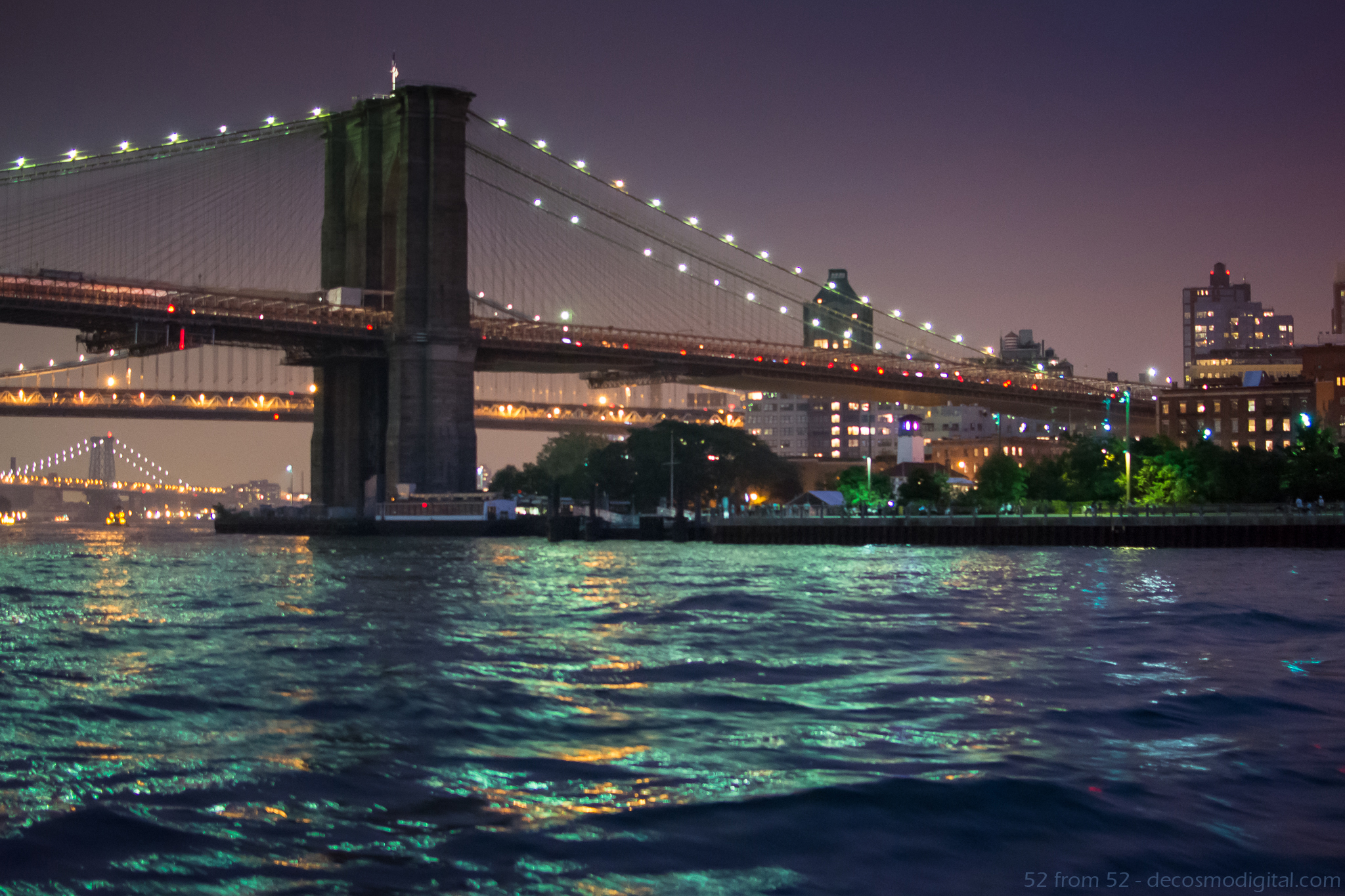
Picture Specs: ISO 4000, 35mm, f/2.8, 1/13sec

Picture Specs: ISO 4000, 35mm, f/2.8, 1/13sec

Week 4 (8/25/2013 – 8/31/2013): East River, New York, NY
Picture taken on 8/28/2013 at 8:10 PM

Picture Description:

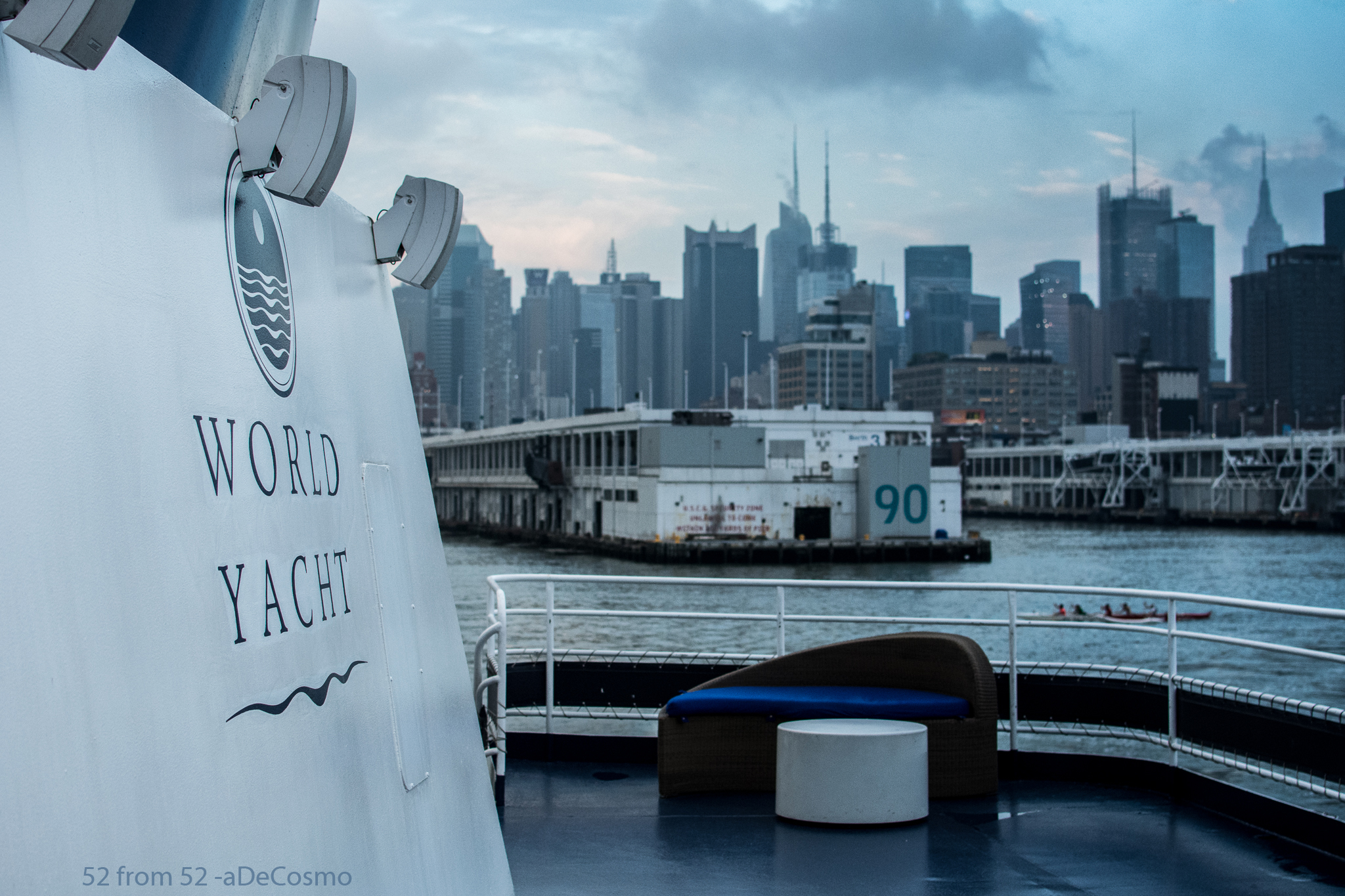
I’m on a Boat!!! Well…I was on Wednesday and that’s where I got the picture for this week’s post.  Hopefully you get the reference and if you don’t shame on you, go watch some SNL highlights.  Unlike the members of “The Lonely Island” I was not on a boat to shoot a music video with T-pain (damn), I was celebrating my parent’s 30th wedding anniversary.  We spent the evening on the Duchess which is part of World Yacht’s fleet of party boats.  Our cruise left from pier 81 at around 7PM and provided us with beautiful views the entire night!  I highly recommend booking a trip on World Yacht if you’re looking for a unique way to celebrate an occasion or trying to plan a memorable night out in the city.

View from the top deck of "Duchess" - World Yacht

View from the top deck of “Duchess” – World Yacht

Going into the evening I knew I’d have plenty of scenic picture opportunities but since I was there for my parents the time I could devote to getting a picture was limited.  Luckily I ended up sitting right next to a window which opened and allowed me to lean out and get this week’s picture.  The Brooklyn bridge is one of the most iconic New York City landmarks so when it appeared on the horizon I immediately put my steak knife down and grabbed my Nikon.  The shot I got is of the “BMW” bridges or Brooklyn, Manhattan, and Williamsburg bridges as we traveled North on the East river.

Photography Concepts:

If there was one overall lesson I learned this week, it’s that taking pictures on a boat and at night is VERY difficult.  First, the lighting is inconsistent  (low, high, indoor, outdoor)  which makes it difficult to tune in your exposure.  Second, surprise the boat is moving good luck focusing! Third, if you’re taking pictures of subjects off the boat you have to act fast because you have a very small window to get the shot you just saw.  As a result of hitting moving targets your composition is constantly changing.  Normally when you frame up a picture you’re standing still so you can get a couple pictures, not on a boat, snap fast and often!  In my opinion the combination of moving targets and low light was definitely the hardest aspect of this week.

This picture was tricky and I definitely wish I had a couple more shots at it.  Just like last week I had to use a high ISO but this time it was almost double (4000) which starts to show the negative attributes of a high ISO.  My picture (pre-edit) was a little grainy which is what happens when you use a high ISO.  I won’t try to explain why graininess (aka noise) happens but there are plenty of places to read about it online (one linked below).  While editing my picture in Lightroom I did my best to lessen the graininess by using some noise reduction corrections, which made for a softer (less sharp) image.  This is the first time I’ve mentioned Lightroom but let me tell you, it’s awesome!  I’ll talk more about it another time but I highly recommend it for editing/organizing all your pictures.

Other than a high ISO to make up for the limited amount of light I also had to use a wide aperture (f/2.8) and slow shutter speed (1/13 of a second!).  Now remember slower shutter speeds blurs motion so using one on a moving boat is risky.  I think this picture came in focus enough but if I was on land it would have been a lot sharper and I probably would have used a tripod.  I could have opened my aperture more (max f/1.8) to enable a faster shutter, but the wider the aperture the shallower the depth of field which isn’t ideal for a landscape picture.  As I mentioned earlier the window (especially when shooting through a literal window!) of opportunity for a picture is limited so I didn’t have enough time to work my way up the aperture scale (large to small).  Even if I had more time though a shutter of 1/13 is already too slow so I couldn’t drop that any further which I’d have to do if I shrunk my aperture.   As I said, this was a tricky picture.

One more big lesson that I learned this week (which isn’t really demonstrated in this picture) was the importance of white balancing.  While taking picture inside the boat everything seemed yellowy due to the indoor lighting.  Once the light stabilized inside I took a couple pictures of my white balance cards in the different parts of the boat so I could adjust everything in Lightroom later.  Let me tell you WOW what a difference!! I’ll try to get a picture in the coming weeks to demonstrate the usage of white balancing.  If you’re a beginner like me you’re going to be surprised by the results.

Links:

World Yacht Site: http://bit.ly/14KB8zR

ISO/Noise Article: http://bit.ly/18qN5bB

Unplanned “Destiny”

Picture Specs: ISO 2500, 35mm, f/2.2, 1/4000sec

Picture Specs: ISO 2500, 35mm, f/2.2, 1/4000sec

Week 3 (8/18/2013 – 8/24/2013): Shipyard Park, Hoboken NJ
Picture taken on 8/22/2013 at 6:25PM

Picture Description:

This week’s picture is a perfect example of how sometimes the best things aren’t planned. Opportunities present themselves when you least expect them, don’t get tunnel vision, especially in photography.

All week I planned on getting one of two shots, either a night scene in New York City or a sunset shot in Hoboken at Pier 14. I had a clear picture in mind for both ideas and scouted out locations where I could execute my idea. I was busy in the beginning of the week so I was aiming to take my picture on Thursday.

When I rolled out of bed Thursday morning still recovering from the night before (awesome night! Boozing for charity/Benjamin’s Steakhouse…Google it), I said to myself there is no way I’m going to have the energy to cruise the city streets late at night for the picture I had in mind. Luckily I had a plan B, Pier 14. After work during my run I did a quick drive by of pier 14 to make sure everything was good for later. Upon getting to my spot I noticed that this massive boat called “destiny” (ironic I know) was parked right in the way of what would be my view of the sunset. In addition to the giant boat there were a bunch of workers welding in the area that would be in the background of my shot. I thought to myself “ah maybe it will make for a better picture”….it didn’t.

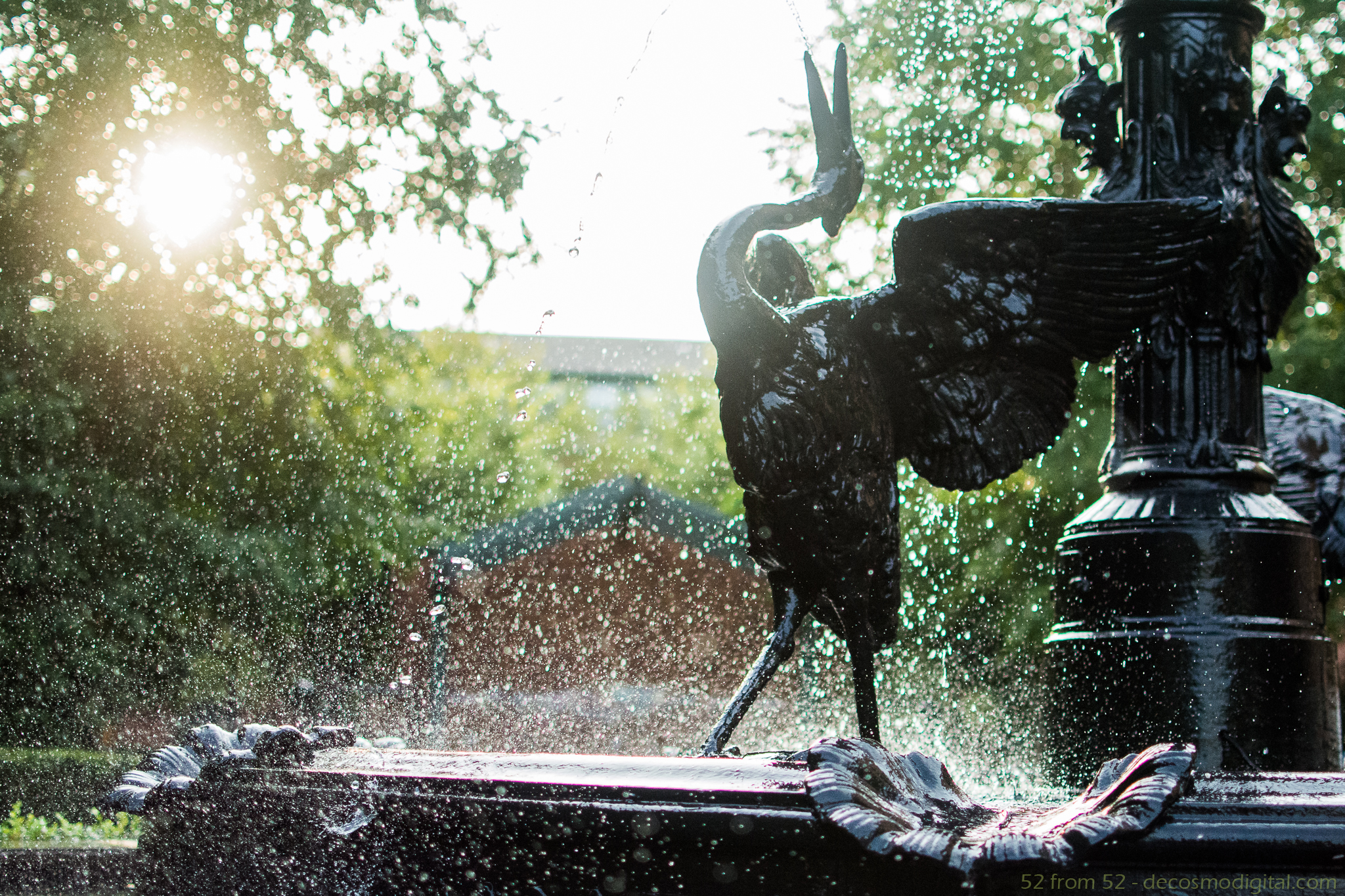
When I returned about an hour later the picture was nothing like I had planned no matter what angle I shot it from. At this point it would have been too much of a hassle to bolt into the city for my original plan so I decided to start walking around. While wandering around I remembered seeing a fountain in Shipyard Park which could make for a good picture. When I got to the fountain I realized that thanks to “destiny” I stumbled upon the perfect shot!  The sun was at the perfect angle and I had the park all to myself.

Photography Concepts:

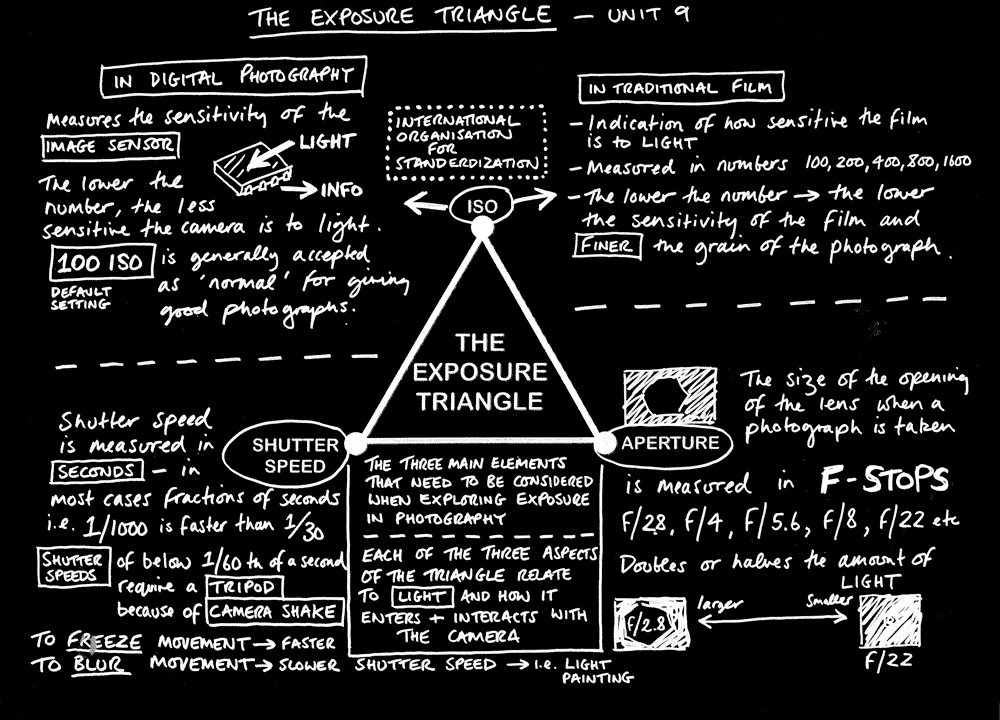
The most important part of this picture was capturing it with the fastest shutter speed possible. The quickest my camera can take a picture is in 1/4000 of a second, which compared to your average camera or iPhone is noticeably faster. The high speed shutter is what gave me the ability to freeze the water droplets and splashing. In order for me to use a super fast shutter I had to compensate with a very high ISO of 2500 and almost wide open aperture of f/2.2. Now although I mentioned “boosting” ISO in my previous post I didn’t explain it’s relationship to making your picture brighter. To put it plainly ISO is your camera’s sensitivity to light, lower number = less sensitive which means your sensor needs more light from either a slower shutter speed or wider aperture. The higher the ISO the less light you need from your shutter or aperture. These three aspects of a camera’s settings (ISO/Aperture/Shutter) are commonly referred to as the “Triangle of Photography”. I’ll try to explain this more in another post, but for now if you want to read more about ISO below is a really good article from NIKON. This article also explains the negative aspect of ISO which I’m yet to talk about.

See below for image source

See below for image source

When it came to framing the picture I followed the rule of thirds to position the key elements (bird, sun, water droplets). The bird is just about on the intersection point of the center/right thirds leaving the remaining two thirds of the horizontal space to be filled with splashing. As for the lighting angle back-lit vs front-lit, I took the picture both ways and found that the back-lit (sun/light source behind subject) looked way better because all the light shined through the water droplets. With the sun in the rear, the droplets captured the light and made for a cool almost glowing effect.

The one thing I should have tried but totally forgot was to take a couple pictures with flash. Although it might have lit up the bird too much, based on everything I’ve read flash freezes motion and in this case might have made the water droplets more prominent. On the bright side (pun intended) it’s something to walk away with, I’ll have to mess around with flash for a future post.

Nikon Article: http://bit.ly/1dAdide
Image source – Via Google search http://bit.ly/14pBJ9X